How I Generated the Cue File of Sound Tracks from a Ripped CD
Background
Ripping CDs to digital audio files has become a routine task for audiophiles and music collectors. Tools like Exact Audio Copy (EAC), dbpoweramp, or even iTunes make it trivial to extract audio tracks from CDs and convert them to various formats. However, creating the corresponding cue files - those essential metadata files that preserve track boundaries, titles, performers, and timing information - remains a surprisingly tiresome, manual process.
When you rip a CD, you typically get the audio files, but the detailed track information embedded in cue files requires painstaking data entry. You need to type in each track title, performer names, composer information, and precise timing indexes - all information usually found only in the physical album pamphlet. This process has been poorly automated, especially for classical or obscure recordings that aren’t indexed in mainstream databases like Gracenote, MusicBrainz, or Discogs.
The problem
Recently, I purchased a CD album from a used record store in Osaka’s famous Den Den Town - DENON COCO-7418 and COCO-7419, featuring Lorin Maazel conducting the Berlin German Opera Orchestra in Georges Bizet’s Carmen.
This particular recording from 1970 is legendary among opera enthusiasts. It features Anna Moffo as Carmen, Franco Corelli as Don José, Piero Cappuccilli as Escamillo, and Arleen Auger as Micaëla. The performances are exceptional, capturing the passion and drama of Bizet’s masterpiece with remarkable clarity.
Here’s the problem: despite being a famous recording, these catalog numbers (COCO-7418/7419) weren’t indexed in any mainstream metadata platforms. No automatic lookup could provide me with the detailed track information I needed for proper cue files.
I was left with:
- A folder of ripped WAV files (Track 01, Track 02, etc.)
- The original album pamphlet with detailed Japanese descriptions and French track titles
- No automated way to bridge this gap
The traditional approach
The traditional approach would have been:
- Open the pamphlet
- Read each track’s information
- Type it into a text editor or cue file generator
- Use audio software to determine exact track timing and indexes
- Calculate precise INDEX markers for sub-tracks
- Repeat for both CDs
This process is tedious, error-prone, and frankly, boring. For a 2-CD opera with 31 total tracks and multiple INDEX markers within many tracks, this could easily take 2-3 hours of concentrated work.
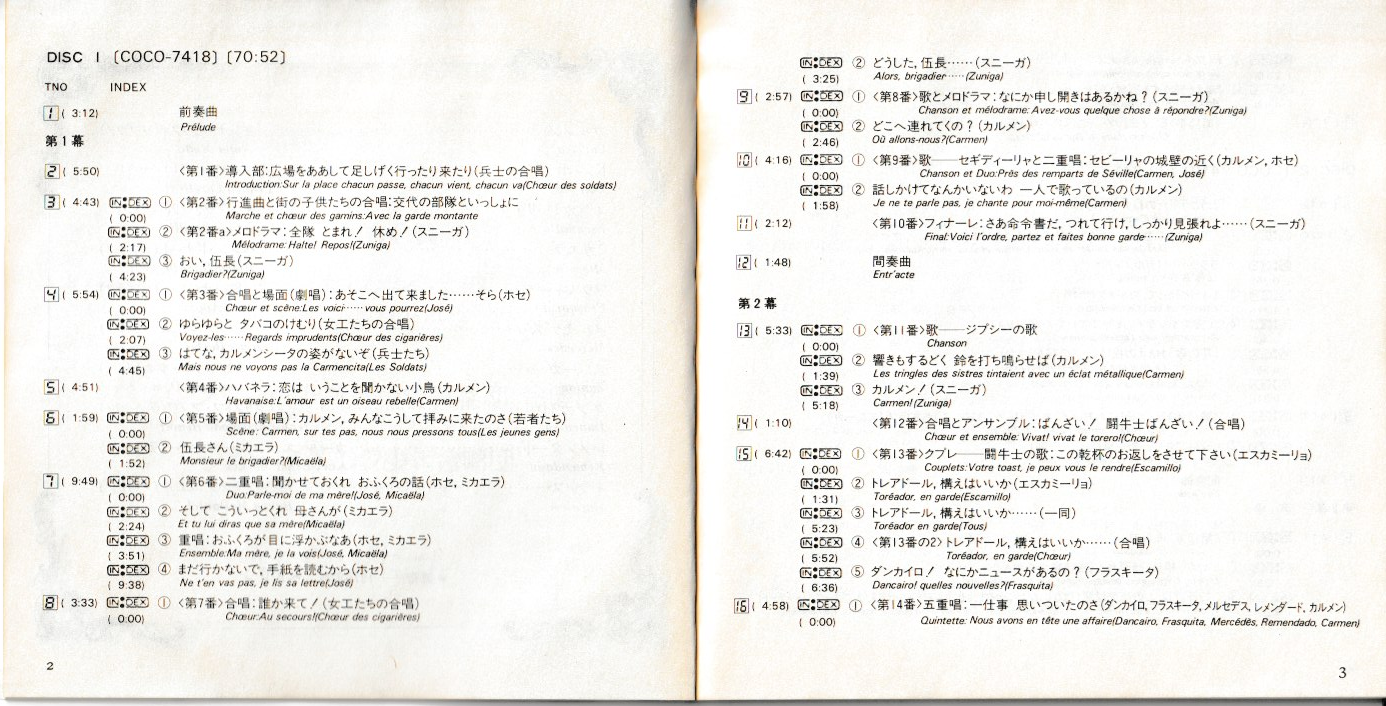
Figure 1: The album pamphlet containing all track information in Japanese and French
The solution
I realized that while I didn’t want to spend hours typing, I could leverage modern AI tools to do the heavy lifting. Here’s how I approached it:
Step 1: Digitize the pamphlet
First, I scanned the album pamphlet into my computer. This gave me high-quality images of all the track information, performer credits, and timing details.
Step 2: OCR with Gemini
Next, I used Google’s Gemini-2.5-flash model to perform OCR (Optical Character Recognition) on the scanned images. I uploaded the pamphlet images and asked Gemini to extract all the text, preserving both the Japanese and French content.
The result was a clean text file (info.txt) containing:
- Album title, composer, and performers
- Track titles in both Japanese and French
- Timing information and INDEX markers
- Act/scene divisions for the opera
This step took about 5 minutes, and the accuracy was impressive - Gemini handled the mixed Japanese-French text beautifully.
Step 3: Prepare the audio files
I organized my ripped WAV files into two directories:
Carmen_LorinMaazel/
├── DISC1/
│   ├── CD Track 01.wav
│   ├── CD Track 02.wav
│   └── ...
├── DISC2/
│   ├── CD Track 01.wav
│   ├── CD Track 02.wav
│   └── ...
├── info.txt (from OCR)
Step 4: Ask the AI agent for help
This is where the magic happened. I opened my AI coding assistant and had a conversation:
Me: “Please help me generate cue files for my ripped CD. I have WAV files in DISC1 and DISC2 directories, and all the album information in info.txt. Can you create detailed cue files with proper track titles, INDEX markers, and performer information?”
That was it. One simple prompt.
What happened next
The AI agent understood my request and immediately:
- Read the info.txt file to understand the album structure
- Explored the directory to see what WAV files were available
- Extracted metadata from each WAV file using ffprobe to get precise durations
- Correlated everything - matching the pamphlet information with the actual audio files
- Generated two complete cue files with all the proper formatting
I didn’t need to explain:
- What a cue file format looks like
- How to extract audio metadata
- How to calculate INDEX markers
- The relationship between the pamphlet and the audio files
The agent figured all of that out on its own.
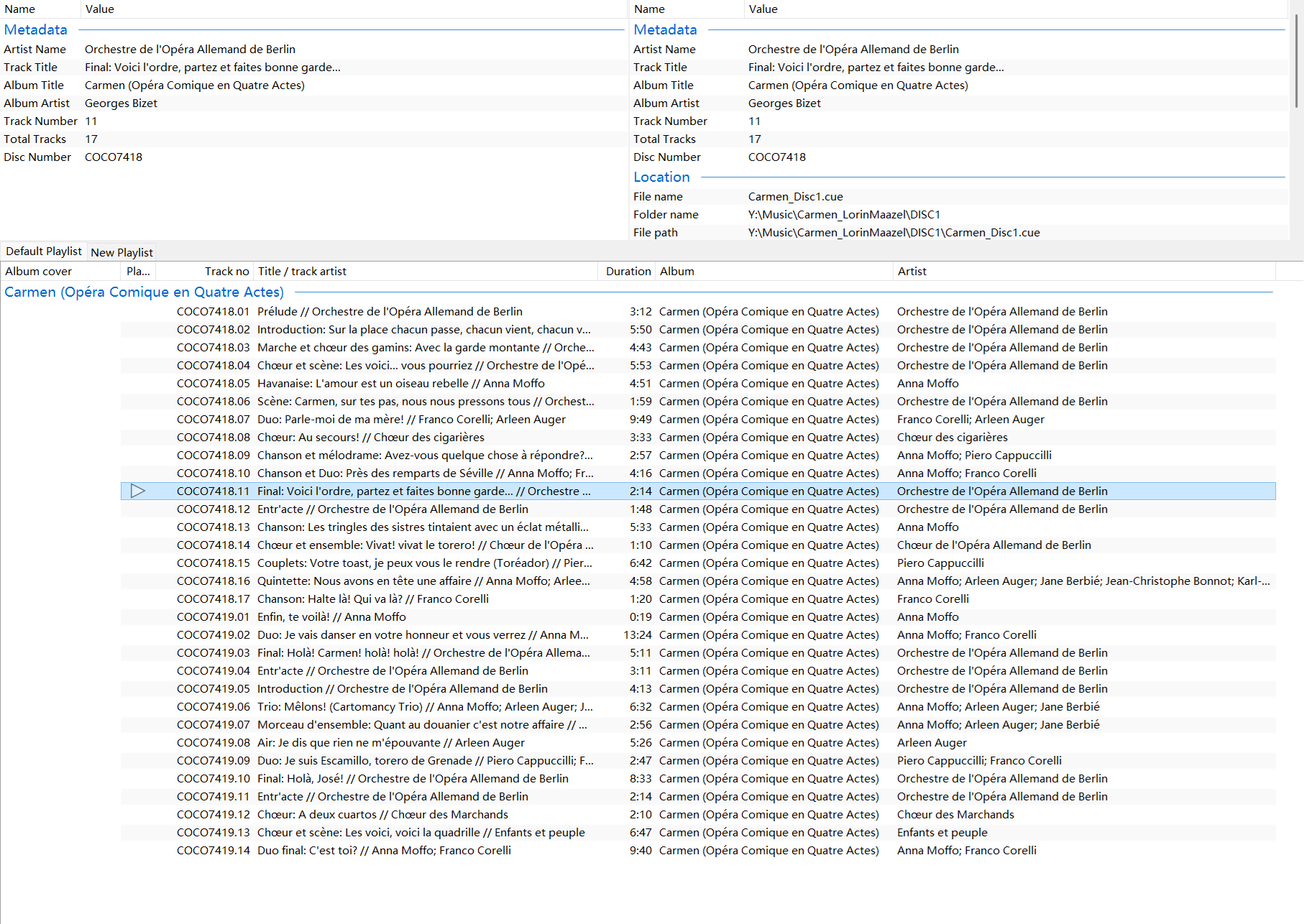
Figure 2: The generated cue files loaded in foobar2000, showing all tracks with proper metadata
The result
Two minutes later, I had two complete cue files:
DISC 1 (COCO-7418): 17 tracks covering Prélude, Act I, and most of Act II DISC 2 (COCO-7419): 14 tracks covering the remainder through Act IV
Each cue file included:
- Proper album and composer attribution
- Correct track numbering
- French opera titles (the original language)
- Performer names for each vocal number
- Precise INDEX markers for sub-tracks
- File references matching my actual WAV filenames
The output was ready to use immediately - no manual corrections needed.
Why this approach works
Natural interaction
I didn’t need to learn any special tools or write scripts. I just had a conversation with my AI assistant in plain English. The agent understood the context, figured out what needed to be done, and did it.
Handles obscure recordings
This method shines where automated services fail. Mainstream databases focus on popular releases, leaving classical recordings, Japanese pressings, and rare albums poorly indexed. By combining OCR (to digitize the pamphlet) with an AI agent (to process that information), this method works with any recording, provided you have the original documentation.
Preserves original metadata
Rather than relying on crowd-sourced databases that may contain errors or incomplete information, this method captures the exact information from the original album pamphlet.
Massive time savings
For a multi-disc set like this opera (2 CDs, 31 tracks), what would have taken 2-3 hours manually took about 10 minutes total:
- 5 minutes: Scanning pamphlet + OCR with Gemini
- 2 minutes: AI agent generating the cue files
- 3 minutes: Verification and loading into my music player
How you can do this too
If you want to replicate this approach, here’s what you need:
Tools:
- A scanner or phone camera (for digitizing the pamphlet)
- An OCR tool (Gemini-2.5-flash or similar)
- An AI coding assistant
- Your favorite CD ripping software
- ffprobe (part of FFmpeg) - though the AI agent can handle this
Workflow:
- Rip your CDs to digital audio files
- Scan the album pamphlet/liner notes
- Use Gemini (or similar) to OCR the scanned images into text
- Organize everything in a folder
- Ask your AI assistant: “Please generate cue files for my CD rip using the information from the pamphlet”
- Verify and enjoy!
Real-world tips
Based on my experience, here are some practical suggestions:
Scanning quality: The better your scan, the better the OCR results. I used 300 DPI and made sure the text was clear and well-lit.
OCR verification: After Gemini performs OCR, quickly scan the output for any obvious errors. In my case, the Japanese-French mixed text was handled perfectly, but it’s always good to check.
Folder organization: Keep everything together - audio files, OCR text, and original images. This makes it easier for the AI agent to understand the context.
Be specific in your request: While my simple prompt worked well, you could add more specific instructions if needed:
- “Include INDEX markers for sub-tracks”
- “Use French titles as the primary track names”
- “List performer names for each vocal number”
Limitations and considerations
While this approach is powerful, it has some limitations:
-
Requires physical documentation: You need the original album pamphlet or access to track information. Without source documentation, the agent can’t work effectively.
-
OCR quality matters: Poor scans or unusual fonts can lead to OCR errors. Always verify the OCR output.
-
Language considerations: Gemini handled Japanese-French mixed text beautifully, but extremely rare languages or poor printing quality could pose challenges.
-
Verification recommended: Always spot-check the generated cue files, especially for critical INDEX markers.
Conclusion
Creating cue files for ripped CDs has been a persistent pain point for digital music collectors. Traditional manual data entry is time-consuming and error-prone, while automated services often fail for obscure or specialized recordings.
By combining modern AI tools - Gemini for OCR and an AI coding assistant for processing - I transformed a 2-3 hour manual task into a 10-minute workflow. The resulting cue files for my DENON COCO-7418/7419 recording of Carmen were accurate, detailed, and ready to use immediately.
This approach is particularly valuable for:
- Classical music collectors with complex indexing needs
- Fans of Japanese releases seeking proper documentation
- Anyone with rare or obscure recordings not in mainstream databases
The key insight is that we don’t need specialized tools for every problem. Sometimes, a general-purpose AI assistant that can understand context and figure things out is more effective than a dedicated tool that requires manual configuration.
My Carmen recording now has proper cue files, preserving all the detail from the original album pamphlet while maintaining the convenience of digital audio files. The workflow was smooth, the interaction felt natural, and the results are perfect.
This recording (DENON COCO-7418/7419) features Lorin Maazel conducting the Berlin German Opera Orchestra, with Anna Moffo, Franco Corelli, Piero Cappuccilli, and Arleen Auger. Recorded in Berlin, Autumn 1970.